





AX 2012 - Report Programming Guide / MVC

I hope everyone is doing well, and ready to get back into the swing of things. If your like me, you enjoyed the long weekend, but ready to get back to a normal schedule. This time of year is always busy, and we have so much to cover for the Dynamics Ecosystem, as well as specifics around Microsoft Dynamics AX 2012.
With that, I thought I would start off this week, with a focus around a tweet I saw on my way to the airport this Monday morning. I saw the following asked: "Is the new AX 2012 Reporting Development model based on MVC Design Pattern?" The short answer to this question, is Yes!.
For those that are familiar with the concepts behind MVC, or Model-View-Controller, then this is a great move in reporting. If your not that familiar with the MVC concepts, wikipedia.org has a great little stub home for this topic.: Wikipedia.org MVC Home.
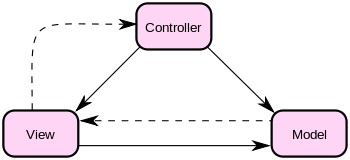
"Model–view–controller (MVC) is a software architecture,[1] currently considered an architectural pattern used in software engineering. The pattern isolates "domain logic" (the application logic for the user) from the user interface (input and presentation), permitting independent development, testing and maintenance of each (separation of concerns).
Model View Controller (MVC) pattern creates applications that separate the different aspects of the application (input logic, business logic, and UI logic), while providing a loose coupling between these elements."
Now, lets get to the specifics for Dynamics AX 2012, around this concept and how this design pattern is applied for reporting. First off, the following will give you a high level understanding of how the MVC pattern maps to real concepts, and class frameworks in AX 2012, as well as a link to the recently released programming guide for AX 2012.: MSDN: Reporting Programming Guide [AX 2012].
Model: SrsReportDataContractUIBuilder
View: SrsReportDataContract
Controller: SrsReportRunController
Finally, you have the following which is a direct link to download the Report Programming Guide for AX 2012: [AX 2012] Report Programming Guide
I will be spending a lot of time around reporting, as well as the overall BI story for AX 2012. For now, this is a good start, and I thought a good way to start the week. Focused on the answer to a question, with some great resource information from Microsoft. Yes, the reporting programming modeling in AX 2012 is based around MVC.
Till next time!


Labels: 64 bit, AX 2012, Dynamics AX 2012, Microsoft, MVC, Reporting Architecture, Reporting Model, Reporting Programming Guide
posted by brandon | 1:15 PM
|
0 comments


