Dynamics AX
  RSS Feed  LinkedIn  Twitter
Want to turn you're data into a true asset? Ready to break free from the report factory?
Ready to gain true insights that are action focused for truly data informed decisions?
Want to do all of this across mutliple companies, instances of Dynamics and your other investments?
Hillstar Business Intelligence is the answer then! (www.HillstarBI.com)

Hillstar Business Intelligence for Microsoft Dynamics AX and NAV on Mobile, Desktop, Tablet


Let us prove to you how we can take the complexity out of the schema and truly enable users to answer the needed questions to run your business! Visit Hillstar Business Solutions at: www.HillstarBI.com

Monday, November 28, 2011

AX 2012 - Reporting on the brain!


Well, reporting is a hot topic for sure with the release of Microsoft Dynamics AX 2012. This is something I've been covering some already, and Microsoft has a great post out today, on how to correctly Scale Out SSRS and AX 2012.


The link to the TechNet article on this topic can be found here.: How to: Configure a Report Server Scale-Out Deployment (Reporting Services Configuration)

What's another great article to point out, and this applies to scale of services in AX 2012, is the following: Configuring network load balancing for services [AX 2012]. This link then, helps not only enable scale of reporting, but also gives us firm 'Yes' services, and therefore integration points, can scale out via NLB as well.

Finally, the article that brought this together today, is from the following: Microsoft Dynamics AX 2012 Reporting Services – Scale-out deployments

I recommend really review the above, and understanding the fact that, when it comes to certain roles in Dynamics AX, relating to performance and Scale, sometimes the role is meant to scale out, vs. scale up.

Also, here is a list of reporting blog post I have done recently:

As you can see, as the title of the post implies, reporting is for sure on the brain, for AX 2012. The idea, is to better understand the concepts, the model, the delivery options, as well now as the ability to scale out for reporting needs.

I actually, as stated earlier today, have a lot of great post that will be covering the BI story more generally, as well as specifics for AX 2012 that will build from these kinds of post. That's all for now though, check back soon!

Till next time!

"Visit the Dynamics AX Community Page today!"


Labels: , , , , , , , , ,

AX 2012 - Report Programming Guide / MVC


I hope everyone is doing well, and ready to get back into the swing of things. If your like me, you enjoyed the long weekend, but ready to get back to a normal schedule. This time of year is always busy, and we have so much to cover for the Dynamics Ecosystem, as well as specifics around Microsoft Dynamics AX 2012.

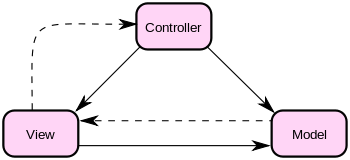
With that, I thought I would start off this week, with a focus around a tweet I saw on my way to the airport this Monday morning. I saw the following asked: "Is the new AX 2012 Reporting Development model based on MVC Design Pattern?" The short answer to this question, is Yes!.

For those that are familiar with the concepts behind MVC, or Model-View-Controller, then this is a great move in reporting. If your not that familiar with the MVC concepts, wikipedia.org has a great little stub home for this topic.: Wikipedia.org MVC Home.


"Model–view–controller (MVC) is a software architecture,[1] currently considered an architectural pattern used in software engineering. The pattern isolates "domain logic" (the application logic for the user) from the user interface (input and presentation), permitting independent development, testing and maintenance of each (separation of concerns).

Model View Controller (MVC) pattern creates applications that separate the different aspects of the application (input logic, business logic, and UI logic), while providing a loose coupling between these elements."


Now, lets get to the specifics for Dynamics AX 2012, around this concept and how this design pattern is applied for reporting. First off, the following will give you a high level understanding of how the MVC pattern maps to real concepts, and class frameworks in AX 2012, as well as a link to the recently released programming guide for AX 2012.: MSDN: Reporting Programming Guide [AX 2012].

Model: SrsReportDataContractUIBuilder
View: SrsReportDataContract
Controller: SrsReportRunController

Finally, you have the following which is a direct link to download the Report Programming Guide for AX 2012: [AX 2012] Report Programming Guide

I will be spending a lot of time around reporting, as well as the overall BI story for AX 2012. For now, this is a good start, and I thought a good way to start the week. Focused on the answer to a question, with some great resource information from Microsoft. Yes, the reporting programming modeling in AX 2012 is based around MVC.

Till next time!

"Visit the Dynamics AX Community Page today!"


Labels: , , , , , , ,

Sunday, November 06, 2011

Upgrading Reports for AX 2012 - Resources


I wanted to take the time today, to point to two resources on Microsoft TechNet. This is related to upgrading reports from AX 2009, to AX 2012. The very first thing that must be clear, is that No Reports will be upgraded to the new SSRS Reporting Model for AX 2012.

With that said, MorphX reports as well as ReportLibraries can still live within AX 2012. There is actually a process in which you have to execute that will take the metadata for the AX 2009 ReportLibraries and update them, so they can live and execute within an AX 2012 instance. That resource can be found here.: Report Project Upgrade [AX 2012]

Further, there is a guide: Guidance when Upgrading Reports [AX 2012].
"Reports are not upgraded automatically during the upgrade process. Microsoft Dynamics AX provides hundreds of default, out-of-the-box reports that you can deploy and customize. To upgrade MorphX reports, we recommend that you customize a default report. The default reports run on SQL Server Reporting Services. Reporting Services is a server-based reporting platform that provides comprehensive reporting functionality for a variety of data sources.

When upgrading to Microsoft Dynamics AX 2012, existing Reporting Services reports and reports based on the MorphX reporting framework are copied to the Microsoft Dynamics AX 2012system. However, they will not be upgraded."


The reporting model, metadata, as well as data structure changes, all within AX 2012 make it impossible really, and not a lot of value, for trying to upgrade, say an MorphX report, or even a ReportingLibrary to the new report model. This is an area of an Upgrade that will need attention for sure. Doing this, also means that you can take advantage of a lot of great new reporting tools, around Microsoft Excel PowerPivot as well as the new Microsoft Dynamics AX 2012 - Excel Add-in.

I will be covering this topic, in the class I'm leading next Tues at AXUG summit. I'm doing my final preps for sessions now, and looking forward to seeing everyone out there. You can follow me, as I will also be covering the event live from my twitter account: twitter.com/DynamicsERP.

That's all for now. Look for some updates while at AXUG, as well as my tweets. Also regular postings will pick back up after AXUG Summit next week.

Till Next Time! Cool Beans? ;-)

"Visit the Dynamics AX Community Page today!"


Labels: , , , , , , , , , ,


Copyright 2005-2011, J. Brandon George - All rights Reserved