Dynamics AX
  RSS Feed  LinkedIn  Twitter
Want to turn you're data into a true asset? Ready to break free from the report factory?
Ready to gain true insights that are action focused for truly data informed decisions?
Want to do all of this across mutliple companies, instances of Dynamics and your other investments?
Hillstar Business Intelligence is the answer then! (www.HillstarBI.com)

Hillstar Business Intelligence for Microsoft Dynamics AX and NAV on Mobile, Desktop, Tablet


Let us prove to you how we can take the complexity out of the schema and truly enable users to answer the needed questions to run your business! Visit Hillstar Business Solutions at: www.HillstarBI.com

Friday, December 30, 2011

AX 2012 - Run Reports without hitting the Production DB


Update: a reader of this post pointed out that this would not work for the setup using log shipping. Using log shipping is for HA, and he is 100% correct. The log shipped db will remain in standby mode and therefore the .net bc would fail in connecting to it. So instead of using log shipping replace that concept either with replication, or mirroring. The other points that people have brought up, including the same reader, is the cost for the license for the SQL server as well as the extra AOS needed. This is true, however if the desire is to offload the processing of reporting resources from the production, transactional db, then the cost of the extra license would have to be used in order to weight the value in which such a setup could bring. With this, still it is possible to have a reporting database that is different than the production transactional db.


I hope everyone had blessed and wonderful holidays! I hope that you got plenty of time with family, friends and loved ones. I wanted to make sure and get one last post in, for the year 2011. Man, what a great year it has been, for the Dynamics Community and Ecosystem.

There are plenty of great wrap up post going on for 2011, as well as some predictive post as well. So, for my 800th post on this blog, and to close out 2011, I wanted to leave you all with a late Christmas gift, if you will. That is, as the title of this post suggest, a way to run AX 2012 Reports, without hitting the Production Database!


What we see in the above image, is the reporting architecture diagram from MSDN. This explains for us, the steps in which a typical, modeled driven solution report executes and fires from menu item execution, to rendering within the AX Rich client that is hosting the report viewer control.

Now lets take this understanding, along with how to setup multiple instances of SSRS on the same server role, and use this understanding to design a solution that will enable us to run all AX reporting from a Reporting Database. This includes both out-of-the-box and custom developed AX-SSRS Reports!.


Important: This approach has not been widely tested. This is not a solution from Microsoft, but something I've been thinking about how to achieve myself. Use this at your own risk, without any warranty or guarantee's.

So, in order to properly understand how we can do this, safely, and securely, and be able to maintain and support such a design, lets revisit a simple architecture that shows the server roles of how a standard AX-SSRS is setup. To help better understand this point, I've created the following diagram in Visio, that illustrates such a standard setup.


With the above, we see a simple architecture that shows off how SSRS and AX work together. It's via the application layer, and how the default .Net Business Connector configuration is used on the SSRS server role, to point SSRS to the right instance of AX.

The AX instance, has within it, the information that connects it to SSRS. This way when the menu item is fired, from the Rich Client, the AOS then uses the information contained within it's setup about Reporting Servers, to understand what SSRS instance to fire.

Since the default .Net Business Connector configuration for SSRS is pointing back to the same AX instance, when the SSRS instance is executing the reporting and firing the Data Extensions to get to the correct Query object and therefore data, then in this standard approach, we are hitting the production database for your instance of AX. Of course, this could be any instance, we are saying production because the goal is to offload the resource needs of processing reports, away from your production database.

Now that we have the established understanding of how AX and SSRS works, along with the understanding of how we can actually place a specific config file, that will point SSRS to a specific instance of our choice of AX, lets move forward with our new design.

To help understand this concept, I've created the following diagram in Visio. This illustrates our new, beta>, reporting architecture configuration for enabling the execution of reports, against a replicated reporting database instance of AX 2012.


What we see here, is our simple reporting setup, and we are taking the information we have from setting up multiple instances of SSRS on the same server role, and pointing SSRS, when processing it's data needs, to interact with a different AOS, that is pointing to a log shipping replicated database of AX 2012. So, with this we still have the ability for all the out-of-the-box reports to be fired, as well as executed in batch, server side, EP, etc. but the actual hit against the production database does not take place. Instead the data is accessed from the replicated, new reporting database.

The critical keys that enable this concept are, (1) having the production instance of your AOS and Reporting Server setup, pointing to your SSRS server role within AX. (2) Changing what AOS the SSRS server hits for processing data, by deploying a custom configuration file. (3) Log Shipping is enabled at on the AX Production database, so that the AX Reporting Database is kept up to date with live data.

Keep in mind, with this setup, that all users interact with your production AOS. They never interact with the reporting instance AOS.

Now there is still a concept we have not addressed, and one that is critical to the success of this design. That is code promotion, or change management. Why does this matter? Well simply put, it's because the model store that represents the application now lives as a part of the production database. This then gets replicated when any changes take place.

If we are following the guidelines given to us by Microsoft, for promotion of code to a production instance of AX, via Model Store Files, then we should be fine with this solution. The reason this is the case, is because in doing this, we perform a full compile and full CIL compile within the QA / Test environment. in doing this, and then correctly draining all users from production and shutting down all AOS(es), within our instance. We can then safely move the entire Model Store File, into our production database for AX. Further, we can do the same to our log shipping, reporting database of AX as well.

This means, that before we did this action, we would need to turn off log shipping, while we are importing the model store files into production, and also the reporting database, which is a replica of production. After this was completed, and before enabling users the right to get back connected to AX, enable log shipping again, and your solution is back on-line, with any new changes.

Further to this point, if as part of that new reports were brought in as part of the model store file move, you would deploy the reports from the AX production instance. You would not deploy them, via the reporting instance.

So, with the above information, we have a possible solution that could enable the use of Log Shipping, and some configuration tweaks, that would allow our Production Database to not be affected by Reporting resource needs. Instead the reports are executed against a replicated database. This, in theory then, would work for all reports, including batch scheduled, server side and EP. I do welcome any feedback on this concept from the community. If you feel I'm overlooking something, or have failed to bring to light some critical point, please share and I will update this post.

Well that's it for me for this year. Thanks everyone for reading my blog, and supporting me in this effort. The reason I write is because of you, so thanks and have a blessed and safe Happy New Year! May 2012 be the best year for each and every one of you! Till next year!

Important: This approach has not been widely tested. This is not a solution from Microsoft, but something I've been thinking about how to achieve myself. Use this at your own risk, without any warranty or guarantee's.


Follow Me @:
RSS Feed  LinkedIn  Twitter

"Visit the Dynamics AX Community Page today!"

Labels: , , , , , , ,

Monday, November 28, 2011

AX 2012 - Reporting on the brain!


Well, reporting is a hot topic for sure with the release of Microsoft Dynamics AX 2012. This is something I've been covering some already, and Microsoft has a great post out today, on how to correctly Scale Out SSRS and AX 2012.


The link to the TechNet article on this topic can be found here.: How to: Configure a Report Server Scale-Out Deployment (Reporting Services Configuration)

What's another great article to point out, and this applies to scale of services in AX 2012, is the following: Configuring network load balancing for services [AX 2012]. This link then, helps not only enable scale of reporting, but also gives us firm 'Yes' services, and therefore integration points, can scale out via NLB as well.

Finally, the article that brought this together today, is from the following: Microsoft Dynamics AX 2012 Reporting Services – Scale-out deployments

I recommend really review the above, and understanding the fact that, when it comes to certain roles in Dynamics AX, relating to performance and Scale, sometimes the role is meant to scale out, vs. scale up.

Also, here is a list of reporting blog post I have done recently:

As you can see, as the title of the post implies, reporting is for sure on the brain, for AX 2012. The idea, is to better understand the concepts, the model, the delivery options, as well now as the ability to scale out for reporting needs.

I actually, as stated earlier today, have a lot of great post that will be covering the BI story more generally, as well as specifics for AX 2012 that will build from these kinds of post. That's all for now though, check back soon!

Till next time!

"Visit the Dynamics AX Community Page today!"


Labels: , , , , , , , , ,

AX 2012 - Report Programming Guide / MVC


I hope everyone is doing well, and ready to get back into the swing of things. If your like me, you enjoyed the long weekend, but ready to get back to a normal schedule. This time of year is always busy, and we have so much to cover for the Dynamics Ecosystem, as well as specifics around Microsoft Dynamics AX 2012.

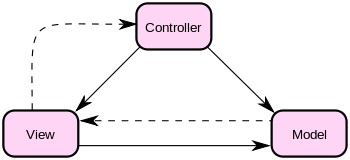
With that, I thought I would start off this week, with a focus around a tweet I saw on my way to the airport this Monday morning. I saw the following asked: "Is the new AX 2012 Reporting Development model based on MVC Design Pattern?" The short answer to this question, is Yes!.

For those that are familiar with the concepts behind MVC, or Model-View-Controller, then this is a great move in reporting. If your not that familiar with the MVC concepts, wikipedia.org has a great little stub home for this topic.: Wikipedia.org MVC Home.


"Model–view–controller (MVC) is a software architecture,[1] currently considered an architectural pattern used in software engineering. The pattern isolates "domain logic" (the application logic for the user) from the user interface (input and presentation), permitting independent development, testing and maintenance of each (separation of concerns).

Model View Controller (MVC) pattern creates applications that separate the different aspects of the application (input logic, business logic, and UI logic), while providing a loose coupling between these elements."


Now, lets get to the specifics for Dynamics AX 2012, around this concept and how this design pattern is applied for reporting. First off, the following will give you a high level understanding of how the MVC pattern maps to real concepts, and class frameworks in AX 2012, as well as a link to the recently released programming guide for AX 2012.: MSDN: Reporting Programming Guide [AX 2012].

Model: SrsReportDataContractUIBuilder
View: SrsReportDataContract
Controller: SrsReportRunController

Finally, you have the following which is a direct link to download the Report Programming Guide for AX 2012: [AX 2012] Report Programming Guide

I will be spending a lot of time around reporting, as well as the overall BI story for AX 2012. For now, this is a good start, and I thought a good way to start the week. Focused on the answer to a question, with some great resource information from Microsoft. Yes, the reporting programming modeling in AX 2012 is based around MVC.

Till next time!

"Visit the Dynamics AX Community Page today!"


Labels: , , , , , , ,

Sunday, November 06, 2011

Upgrading Reports for AX 2012 - Resources


I wanted to take the time today, to point to two resources on Microsoft TechNet. This is related to upgrading reports from AX 2009, to AX 2012. The very first thing that must be clear, is that No Reports will be upgraded to the new SSRS Reporting Model for AX 2012.

With that said, MorphX reports as well as ReportLibraries can still live within AX 2012. There is actually a process in which you have to execute that will take the metadata for the AX 2009 ReportLibraries and update them, so they can live and execute within an AX 2012 instance. That resource can be found here.: Report Project Upgrade [AX 2012]

Further, there is a guide: Guidance when Upgrading Reports [AX 2012].
"Reports are not upgraded automatically during the upgrade process. Microsoft Dynamics AX provides hundreds of default, out-of-the-box reports that you can deploy and customize. To upgrade MorphX reports, we recommend that you customize a default report. The default reports run on SQL Server Reporting Services. Reporting Services is a server-based reporting platform that provides comprehensive reporting functionality for a variety of data sources.

When upgrading to Microsoft Dynamics AX 2012, existing Reporting Services reports and reports based on the MorphX reporting framework are copied to the Microsoft Dynamics AX 2012system. However, they will not be upgraded."


The reporting model, metadata, as well as data structure changes, all within AX 2012 make it impossible really, and not a lot of value, for trying to upgrade, say an MorphX report, or even a ReportingLibrary to the new report model. This is an area of an Upgrade that will need attention for sure. Doing this, also means that you can take advantage of a lot of great new reporting tools, around Microsoft Excel PowerPivot as well as the new Microsoft Dynamics AX 2012 - Excel Add-in.

I will be covering this topic, in the class I'm leading next Tues at AXUG summit. I'm doing my final preps for sessions now, and looking forward to seeing everyone out there. You can follow me, as I will also be covering the event live from my twitter account: twitter.com/DynamicsERP.

That's all for now. Look for some updates while at AXUG, as well as my tweets. Also regular postings will pick back up after AXUG Summit next week.

Till Next Time! Cool Beans? ;-)

"Visit the Dynamics AX Community Page today!"


Labels: , , , , , , , , , ,

Tuesday, September 20, 2011

AX 2012 Reporting Architecture Model Review


With the release of Microsoft Dynamics AX 2012, so many great improvements have taking. One of these area's that has improved greatly is the reporting model used.

In AX 2009, there were two reporting model options really, the X++ reports, and SSRS reports. The option for SSRS reports however had some limits. For example, sub-reports would not work correctly. Also, the ability to use Query objects as the default datasource was limited by the fact of now being able to do outer joins easily with the Query object designer for MorphX.

This is changed however, AX 2012 has a single reporting model, which it uses SSRS for all reports. Now, let me state it is true the older X++ MorphX reporting model is still technically in AX 2012. It's Only there however for backwards compatibility, and is not meant for supporting new development efforts.

Looking at what we have now, there is a very nice, and straight forward MSDN article, that walks through the reporting Architecture from Menu Item, to Report Viewer rendering of the report data. MSDN: Reporting architecture [AX 2012]


We can see that, in the reporting model for AX 2012, SSRS is at the core of reporting. Also, with the improvements that exists with AX 2012, for example adding the keyword having and it's use within Query objects, as well as the ability to have left and right outer joins, easily setup as part of Query objects, the hurdles that existed for SSRS and AX 2009 are all but gone.

This also means, that those who chose to use a hybrid approach for report design in AX 2009 and SSRS, where as the report design included going straight to the Database, creating a new for duplicate security models, no longer is a need. You should never, ever, ever, ever, ever --- ever go directly to the Databases for anything in AX 2012. (hope that's clear!)

If you did go directly to the database, then my recent article on the use of XDS would break as it would not be applied. In AX 2012, if a user does not have access to a field that is part of a report, and the report is rendered correctly through AX+SSRS, then the data for that field will not appear in the rendered report.

I think this is a huge improvement, and there are some really great MSDN articles as well as video's that cover all kinds of reporting examples with the new Reporting model concepts. This area is for sure right on the marketing tag line of Powerfully Simple, as this is a vast improved area over previous versions of AX.

Well that's all for now, check back soon as we continue to dive into AX 2012, get into more Workflows, Security Model, Neat X++ things, as well as launching a new series this October of post, "Freaky Tech Friday's". Till next time!

"Visit the Dynamics AX Community Page today!"


Labels: , , , , , , , ,


Copyright 2005-2011, J. Brandon George - All rights Reserved