Dynamics AX
  RSS Feed  LinkedIn  Twitter
Want to turn you're data into a true asset? Ready to break free from the report factory?
Ready to gain true insights that are action focused for truly data informed decisions?
Want to do all of this across mutliple companies, instances of Dynamics and your other investments?
Hillstar Business Intelligence is the answer then! (www.HillstarBI.com)

Hillstar Business Intelligence for Microsoft Dynamics AX and NAV on Mobile, Desktop, Tablet


Let us prove to you how we can take the complexity out of the schema and truly enable users to answer the needed questions to run your business! Visit Hillstar Business Solutions at: www.HillstarBI.com

Tuesday, June 12, 2012

AX 2012 - New High Avalability Options with SQL Server 2012


With the release of Microsoft SQL Server 2012, came a lot of great new features. Microsoft really listened to its client base, on many fronts for this major version refresh. Now that SQL Server 2012 is here, and we are a few months beyond it's release-to-manufacturing, its time we talk about all the great features it brings to Microsoft Dynamics AX 2012 today!.


One of the topics that I think deserves a lot of focus, is the new AlwaysOn technology for SQL Server 2012. You can find out more general information about this topic from MSDN, from the following resource pages.:

Having an understanding of the purpose for this new technology, lets look at how this can be used to benefit those customers who have decided to use Microsoft Dynamics AX 2012.

The focus for value, in what AlwaysOn for SQL Server 2012, brings to AX 2012 is around High Avalability. In the past, customers when wanting to speak in terms of High Availability, typically focused around active / passive SQL Cluster.


This is still a valid solution, even with SQL Server 2012. However, now it's not the only option, thanks to AlwaysOn technology with SQL Server 2012. This brings us new options around the concept and setup of Database Availability groups.


Now we can have two SQL Server 2012 instances, helping us run, both active, the total solution for a Microsoft Dynamics AX 2012 customer. This means, instead of having a full powerhouse server, just waiting for it's active cousin to crash - both can be used, and each being the target of AlwaysOn failover for specific database.

As the above image suggest, part of the design is deciding which databases will reside on which production SQL Server instance. Both having be the target of AlwaysOn fail overs for each other's availability groups. This is a high value point in terms of SQL Server usage, and something that Microsoft really did right with this release. This means that, as the example shows, Microsoft Dynamics AX Databases can be loaded on one target production instance of SQL Server 2012, while the rest of the production databases can be loaded on another. Both being equal boxes, per resources, and both having each other as their target fail over.

Having this now as a design option for a customer's total solution, means taking full advantage - and deriving the most value - from having chose Microsoft Dynamics AX and the Microsoft stack it resides on.

That's all for today's post, I will do a follow up post to this one, shortly, speaking to the exact experience for having this concept in action. I will end with there is so much going on in the Ecosystem right now, including the upcoming Spring Decisions 2012. I will be attending, are you? Till Next Time!


Visit Hillstar Business Intelligence (www.HillstarBI.com) in order to truly unlock your data trapped in your Microsoft Dynamics investment. With our value driven business intelligence strategy Hillstar help you transform into a data informed company.


Follow Me @:
RSS Feed  LinkedIn  Twitter

"Visit the Dynamics AX Community Page today!"

Labels: , , , , , , , , , ,

Tuesday, March 10, 2009

WCF: The Enterprise Service Bus for Dynamics AX and the rest of the Microsoft Stack

Recently I did an interview with Microsoft's Lachlan Cash. The interview can be viewed here: Microsoft's strategy and vision for Dynamics AX and SOA

In that interview, Lachlan laid out the vision for what role Microsoft see's SOA playing in the current and future of Dynamics AX.

If you read the interview, you will see that the underlying goal and drive is that SOA, or Service-oriented architecture, will be the design principle for inside and outside development of Dynamics AX. This will be delivered by WCF or Windows Communication Foundation, and can have Windows Workflow Framework be used as well as part of the business process design flows that this stragey enables.

So that means that we should focus are energy and attention for the current version of Dynamics AX integration to be geared around WCF adapters. The reason this is the case, is that this will become even more importantly the focus in Dynamics AX 6.0 that is currently scheduled to be released in 2011.

So with that said, lets start to get our minds wrapped around WCF. The best place to start, if you have not already been, is go to the WCF home on MSDN: MSDN - Windows Communication Foundation - Home Page

A great description of what WCF is, can be found here:
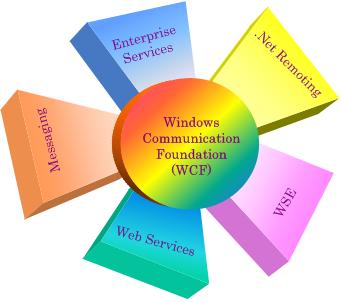
"The WCF unifies the various communications programming models supported in .NET 2.0, into a single model. Released in November 2005, .NET 2.0 provided separate APIs for SOAP-based communications for maximum interoperabilllity (Web Services), binary-optimized communications between applications running on Windows machines (.NET Remoting), transactional communications (Distributed Transactions), and asynchronous communications (Message Queues). WCF unifies the capabilities from these mechanisms into a single, common, general service-oriented programming model for communications.

WCF can use SOAP messages between two processes, thereby making WCF-based applications interoperable with any other process that communicates via SOAP messages. When a WCF process communicates with a non–WCF process, XML-based encoding is used for the SOAP messages but when it communicates with another WCF process, the SOAP messages can be encoded in an optimized binary format. Both encodings conform to the data structure of the SOAP format, called Infoset.

WCF uses a pluggable encoding system, allowing developers to write their own encoders[1]. With the release of the .NET Framework 3.5 in November 2007, Microsoft released an encoder that added support for the JSON serialization format to WCF[2]. This allows WCF service endpoints to service requests from AJAX-powered web pages."


That was taken from the Wiki home page for the Windows Communication Foundation home on wikipedia.org, found here: Wikipedia - Windows Communication Foundation - Home Page

You see when we reference WCF in terms of something that we want to create and make use of, then we are talking about a WCF Service. A WCF Service, as you can read in the wikipedia article, is made up of three parts:


  • Service Class

  • Host Environment

  • Endpoints (aka: Adapters)


So when thinking in terms of today with Dynamics AX 2009, and WCF Service can be defined in the AOT now, and X++ can reference it like a class. This should also be the diffection used for most integrations with AIF, and integrations to and from Dynamcis AX 2009.


(Image Source www.codeproject.com)


This means that when we moved to Dynamics AX 2009, we were a lot closer to having a tighter integration between Dynamics AX 2009 and the rest of the Microsoft stack.

Now there is still a ways to go of course, and since Microsoft is about evolving this, building upon WCF Services now inside and out of your Dynamics AX 2009 instance, means you will be making the right move for the future when Dynamics AX 6.0 & 7.0 comes out.

Because WCF will be moving more and more "into" Dynamics AX and X++, to where WCF could be more tighly used within Dynamics AX itself to delivery internal messaging. This would lead to tighter integration and better introp even more with the rest of the Microsoft stack, which will happen to be also using WCF service to connect and build with.

I think the picture is pretty clear now, WCF should be the focus, and we should start looking into more and more ways of using WCF now and how we will be able to use it in the future.

Some of the latest things out about WCF recently is with REST, Representational State Transfer, which will gives us play into the 2.0 tagged technologies of Enterprise and Web, and the cloud.

Another thing to point out, is how WCF can now, already be used to integrate other existing LOB, Line of Business Applications, like: SAP, PeopleSoft, Oracle, IBM CICS, IMS, etc.

Microsoft released what is calls it's "WCF LOB Adapter SDK" to help with this. The current version is 1.1, and can be downloaded here: WCF LOB Adapter SDK v1.1 Download.

So we have a *Lot* to cover on this as you can tell. The key to take away now, is to start looking into this. Take a dive into the MSDN page, look at the blogs, the articles, what makes up WCF. Also take the time and check out the WCF LOB Adatper SDK. This is a great thing to look at for creating WCF services, that can connect Dynamics AX with other LOB's.

Check back soon, as I will continue to dive into this topic, get back to some SQL Server 2008, cover more BI, and all how it surronds and is used with Dynamics AX.

Also don't miss my post soon on a book review and Author interview I am doing, and the wrap up post on Convergence this week! So much to cover and so little time... see you next time!


"Visit the Dynamics AX Community Page today!"


Labels: , , , , , , , , , ,

Wednesday, November 12, 2008

Dynamics AX - Why it's good: Value point two, "The Stack"

To continue our talks here about why Dynamics AX is good, and even more so in a recession, lets look at the next value point:

The Stack
This is refering to the stack of software that Dynamics AX sits on top of, is a part of and is surrounded by.

Lets look at what Dynamics AX sits on top. If you look at the core parts that make up Dynamics AX: Fat Client, Web Client & Parts, AOS & Database.

Fat Client
This is the normal, everyone is used to using standard front end to the Dynamics AX solution. This client is actually being moved more and more into managed code, but as of right now is built using C++ for it's core. These C++ codes are developed using Microsoft windows core Libs and OS abilities. So the Fat client sits on top of the core Microsoft Windows OS.

This client also has the ability to interact, via X++ Code calls, to .Net assemblies, therefore openning up to the side stack that runs as part of the client experince.

Web Client & Parts
Use to, this was just called web client in my mind, but that has changed with the release of Dynamics AX 2009. This is because Role Centers are being used, and Microsoft Office SharePoint Services are being used to host the Web client and it's many possible and customizable web parts.

This is extending the to the next level of information worker that is actually becoming more commonly used than the Fat client. This, as I already mentioned sits on top of Microsoft Office SharePoint Services, which rides on top of the Microsoft WIndows Server OS.

This part also has access to .Net assemblies / managed code and therefore can be really extended.

AOS or Application Object Server
This is the serving part of the Dynamics AX solution. A company may have many AOS instances working to serve a single Instance of Dynamics AX based on user demand and size. This part is also written right now in C++ but more and more is being ported to be wrote in managed code, or better refered to as .Net.

This sits on top of Microsoft Windows Server OS, and has access to the .Net assemblies / managed just like the others mentioned so far. This means it too can really be extended, even beyond the core possibilities of X++.

Database
This is the heart and soul of a Dynamics AX instance. If you have this running right, tunned and optomized, then you have happy users. This runs on top of Microsoft SQL Server, which itself runs on top of Microsoft Windows Server OS.

With the release of Microsoft SQL Server 2005, SQL Server from Microsoft became a true enterprise level RDBMS. This is the work horse, and offers all kinds of things from just being SQL Server, including: OLAP, BI, SQL Server Reporting Services (SSRS) and much more.

As you can see, just looking at the core parts of Dynamics AX and what it sits on and is closely coupled with, this is truly a business platform. The great thing is, it can be extended, customized and used by people who are already familiar with the Microsoft product stack. That means as a customer, you can take and capitalize on your existing employees knowledge of SQL Server, Windows, .Net, C# SharePoint, Office and so on.

This Value point builds on top of tha last, of being Dynamic, in that the stack is very important. It's important for: Value, Cost, Ability to learn, Flexibility and scalability.

All those are key words into why the stack should matter, and why it's our second value point of discussion for Dynamics AX as a Business Platform.

This leads into our next topic: Platform Check back soon, and see you then!


"Visit the Dynamics AX Community Page today!"


Labels: , , , , , , , , , ,

Thursday, July 12, 2007

Microsoft Dynamics AX infrastructure map (the stack)

Alright,

To back into things I thought I would post a link to a nice Microsoft Dynamics AX page. Basically it is the infrastucture map (the stack) done in a Visio diagram. It's a nice diagram for showing people what all can be a part of the Dynamics AX product stack. Check out the link here: The Stack

Check back soon and we continue to explore the wild wild world of Dynamics AX! :-)

Find a job at: www.DynamicsAXJobs.com

Labels: , , ,


Copyright 2005-2011, J. Brandon George - All rights Reserved