Dynamics AX
  RSS Feed  LinkedIn  Twitter
Want to turn you're data into a true asset? Ready to break free from the report factory?
Ready to gain true insights that are action focused for truly data informed decisions?
Want to do all of this across mutliple companies, instances of Dynamics and your other investments?
Hillstar Business Intelligence is the answer then! (www.HillstarBI.com)

Hillstar Business Intelligence for Microsoft Dynamics AX and NAV on Mobile, Desktop, Tablet


Let us prove to you how we can take the complexity out of the schema and truly enable users to answer the needed questions to run your business! Visit Hillstar Business Solutions at: www.HillstarBI.com

Sunday, January 15, 2012

AX 2012 and the value of Microsoft's Visual Studio LightSwitch


Recently, I posted an article on my column, for the Microsoft Dynamics Community site, in which I focused in on the Any Device ERP concept. The push towards this concept, enabling true mobile ERP, as I stated in the article, will actually help drive adoption of the Microsoft Windows 8 powered devices.


Also, including in this post, I highlighted and pointed to the use of Microsoft Visual Studio LightSwitch. I'm really stoked about this product, and the more and more I look at it, the more value I see it can bring to companies. The value, in which I'm referring to here is all about giving companies the ability to simply, and in a fast nature, create Line-Of-Business Applications quickly and easily. This means faster Time-to-Value for such solutions, that are needed by companies, which can extend from Microsoft Dynamics AX 2012.


We see, with AX 2012, a push for it being the central hub of business logic, operations, data and delivery of business intelligence. With this, we also see the move for exposing data, API's and business logic internal and external of AX 2012, via Services. Because of this, companies can use LightSwitch, and it's ability to quickly and easily create apps that extend AX for a company, and help create a more total solution.

This is done, via AX services, be that Document Services, or Custom Services and Service Operations. Taking this design approach then, of exposing Data and Business logic from AX via services, these services then themselves can be consumed within a LightSwitch Application. A great resource for walking through this, by example can be seen at the following location: MSDN: LightSwitch - Consuming Web Services

From the post: "The aim of this document is to show developers how you can easily configure LightSwitch to consume Web Services. This walk-through assumes you have a background knowledge of creating basic applications with LightSwitch."


Having this example, we can now extend AX 2012, with LightSwitch for internally hosted Line-Of-Business (LOB) applications, on IIS, and even quickly scale and create applications that are deployed to Microsoft's Cloud Offering, Azure. In order to enable the scaling to the cloud, we do need to deploy the AX 2012 Services, via IIS, so that they can be consumed externally by the outside world. Doing this, means then, that quickly and easily we can create a Hybrid cloud story, for AX customers, and quickly bring the value to a customer that the cloud brings with scale, agility, and exposing AX business logic and data for consumption through such LightSwitch created apps.

For those customers, that have invested in AX, working with LightSwitch from Visual Studio 2010, will seem familiar, in how it's ability to work with Entity Data Framework, ease of creating and working with services, as well as the Tree Style design of forms, and buttons, that feels similar to AX and how it's forms and UI elements are designed.


So, if your a Microsoft Dynamics AX Customer, I highly recommend looking into either having your Partner, or your staff work with Microsoft Visual Studio LightSwitch, and how it can be used to extend your AX investment, quickly, efficiently and fast. That's always the goal, and keep in mind Simple is King of value, and let me tell you LightSwitch is one heck of a product that truly simplifies the creation of Line-Of-Business (LOB) applications. It's all about Time-to-Value, and that is why LightSwitch is a tool that should be considered, for completing your companies / customers total solution.

These applications, can then be made a part of the AX story, either hosted externally in the cloud, or internally. After creating and deploying a LightSwitch App, it can be incorporated directly into the user experience, via links hosted within Role Center Pages, to the LightSwitch App UI, or hosted within the AX 2012 Rich Client Forms and UI.


Bringing this full circle and to have a little forward looking exercise here, I personally believe LightSwitch, which currently delivers it's UI via SilverLight, will quickly be updated, once Windows 8 comes out. I believe, that Microsoft will enable you the ability to choose your target UI, be that SilverLight, or XAML+HTML5+JavaScript. The idea, is that LightSwitch will still create the UI for you, and enable fast and easy creation of Apps, that target even the Metro Style UI of Windows 8, and therefore having company specific Win8 Metro Style Apps, that work directly with & extend a companies AX 2012 ERP investment.


The following links, are useful resources that are used throughout this blog post. I would strongly encourage spending time researching and learning from these resources, and others to see how Microsoft Visual Studio LightSwitch can help you drive the most value out of your AX 2012 investment.:

Well that's all for now, I hope everyone has a great productive week. Check back soon as I have a lot of good post coming out, all around AX, the Ecosystem, Spotlights, Interviews and more! Till Next time!


Follow Me @:
RSS Feed  LinkedIn  Twitter

"Visit the Dynamics AX Community Page today!"

Labels: , , , , , , , , , , , , ,

Tuesday, September 27, 2011

Do Not use the .Net Business Connector with AX 2012


With the release of Microsoft Dynamics AX 2012, a lot a great things have come about. One area that I have spent some time on now, is around integration. In the past, when integrating outside line of business (LOB) applications or custom software, the options for enabling this were either the use of AIF Document Services or the .Net Business Connector.

There is good reason not to use the .Net Business Connector, as I point out in the following post: Net Business Connector Not Recommend for AX 2012


A reader today, stated that they have read on the web, and with my blog post, to not use the .Net Business Connector with AX 2012 integration's, but they were not really clear why. I thought this would make for a good post, as to clear the air of sorts on this topic, and explain why.

First you see from the above AX 2012 system architecture image, that the .Net BC is actually used in a few places to enable different parts of the solution. With that said, and beyond this fact, the only reason the .Net BC exists in AX 2012, is to truly support backwards compatibility. Understand this, future versions of AX, beyond AX 2012 will not have the .Net BC as an option. This has been made very clear in the official Microsoft Documentation released on the subject.

This means, that anyone upgrading from previous versions, will still have their integration's developed using the .Net BC, will still work. However, planning should be made to make the switch to make use of services.

The desire behind this move, is to take away proprietary technology that the .Net BC represents, and the RPC protocol it implements, and use more true .Net technologies, like WCF. This move, not only takes a step towards true .Net native code execution, but also replaces the very chatty protocol of RPC, with the less chatty and more well formed protocol of WCF.

So the reasons, for not using .Net Business Connector in AX 2012 are.:
  • 1. Microsoft will not support it beyond AX 2012
  • 2. It using the RPC protocol for communication which is very chatty compared to WCF, and does not enable the vision of cloud computing Microsoft has for AX in version 7.0 and beyond


I started, on this list, to add more, but honestly the first reason in the list is point enough. Microsoft will not support the .Net BC after AX 2012. Since that is the case, any development done with it, or any integration that is not upgraded and changed to make use of WCF and Services in AX 2012 is a waste of time and money.

I hope that through the many efforts of those in the community, including myself, to point to the desired method of services with: Custom services and document services, that it's clear why the .Net BC should not be used. Upgrades are supported to AX 2012 that make use of this technology, however it's important to understand that such integration's have to be changed over for any version of AX beyond AX 2012.

With this, I believe we can move forward and all understand that any integration efforts between AX 2012 and the outside world, should reside around services. This is, as I've pointed out before, a true statement even within AX 2012. Services help abstract some of the complexities of AX 2012, and help empower the marketing term powerfully simple.

That's all for now, but check back soon as I continue with my dive into workflows, and many other great topics. Till next time!

Update: A fellow peer of mine pointed out that this post sounded a little harsh. That is never my intention at all, and I hope this is taking as a warning. The idea is to save you time, money and effort and help deliver a clear message that WCF and services are the way for extending and integrating with AX 2012.

"Visit the Dynamics AX Community Page today!"


Labels: , , , , , , , , ,

Tuesday, August 02, 2011

Microsoft Dynamics AX 2012 - A Dive into System Services, Metadata Service


Recently I wrote last week about Microsoft Dynamics AX 2012, talking about a dive into Services.

One of the area's that I covered in this post was around System Services. To recap:
"System Services are meant to give a window into the Dynamics AX 2012 world. Part of that world involves Query Service, as well as the Metadata Service. These two services are meant to be very specific uses. The Query Service is meant to take and offer an ad-hoc ability to query datasets, from AX 2012."

With this initial post as our guide, lets take and step through these different area's of services, get some real examples, and talk about what kind of value each type can bring to an implementation.

System services, are new in AX 2012, and so their value will develop overtime, and more and more people find ways to make use of them, to drive value. The Query service is meant, as stated, to give the ability to have an ad-hoc nature to query data from an AX 2012 instance. I don't actually recommend using this that much, as we get into Document Services in a later post, and see that most all data access should take place, starting with a query object inside Dynamics AX 2012.

With that said, lets focus our time for this post, on the Metadata service. To start, the system services are auto deployed out of the box, and so there is nothing that you have to do, in other than make a reference to the given Metadata service's WSDL.

To do that, the following is the format for accessing the metadata service.: http://servername:port/DynamicsAx/Services/MetadataService

This, if placed in a web broswer, will bring back the WSDL for this given service, which is true for any service, or service group I should say. You will notice that this is how you make a reference, from say Visual Studio 2010.

In doing so, and if you look at the app.config file from within your project, you will notice though, that the binding is actually net.tcp//. This is because these system services are hosted, out-of-the-box, within the AOS itself. More in a later post on options for hosting services.

Example app.config


You will notice, in the above example app.config file, that I have changed the maxBufferSize and the maxReceivedMessageSize. The reason this is the case, is because my example, with getting metadata about a given table, pulls back a larger resultset than the default settings for this WCF net.tcp binding is configured to receive. If you don't do this, the first time you use the Metadata service, it will error out. Keep in mind, this is WCF we are dealing with, and though it's gotten a lot easier to deal with bindings and settings, it's still something that must be done.

Now that we have our reference within our Visual Studio 2010 project, lets take and dive into working with it.

For our example, lets create some unit of code, that will take and call the metadata service, and in turn ask for metadata about a specific table. The following is the C# code for doing just that.:


For reference, and being able to search with google or bing, the following is that code in plain text:
"Ax2012MetadataService.AxMetadataServiceClient cl =
new Ax2012MetadataService.AxMetadataServiceClient();

cl.Open();

string[] axTableNames = new string[1];
axTableNames[0] = "CustTable";

Ax2012MetadataService.TableMetadata[] axTableMetaData =
cl.GetTableMetadataByName(axTableNames);

MessageBox.Show("Title Field1: " + axTableMetaData[0].TitleField1.Name +
", Title Field2: " + axTableMetaData[0].TitleField2.Name);

cl.Close();"


Now what we have here is straight forward, I'm taking and creating an instance of the AX2012MetadataServiceClient which was generated for me by VS2010, when adding the service reference to the project.

After that, I open the given client object, and fill a string[] array with a single entry, for the "CustTable". After doing this, I take and fill a TableMetadata[] array, which is part of the WSDL DataContracts supplied from AX 2012, with calling the client and a .GetTableMetadataByName(axTableNames) and pass it my string array of tables that only contains, for this example, the CustTable.

After this, I'm able to simply call a message box, and show the Title Fields 1 & 2, that are supplied by AX 2012, and passed back within that TableMetaData[] array.

The result is as follows.:


As you can see, we get back the Title Field information, and really we can get back anything that is contained within the properties of a given table object, which is the metadata for this given type of object.

This is the same for classes, EDT's, enums, forms, etc. etc. This is actually a pretty powerful class, as you can start to see uses of this new service, for given the ability of AX 2012 to describe itself to other LOB applications, as with the correct rights, you can get a list of tables, and then from those tables, a list of every field within those tables, and there EDT's or base enums, and then information about every single one of those.

One thing I will add, is that I have noticed the Autoreports, that run from File > Print > Print for a given form, actually make use of the MetadataService for fulfilling part of it's needs for generating the autoreports in AX 2012. So that is a solid use, of this new offering.

As me move into AX 2012, which was released as GA in 25 countries yesterday, see: Drum Roll Please… Microsoft Dynamics AX 2012 is now on the market!, we will start to see uses of these system services that help enable, extend and the bottom line, drive business value for customers that make use of this great new ERP platform.

Well that's all for now, but check back soon as a whole lot more to come! Till next time!


"Visit the Dynamics AX Community Page today!"

Labels: , , , , , , , , , ,

Thursday, May 26, 2011

.Net Business Connector Not Recommend for AX 2012

Yesterday, I posted the following.: Microsoft Dynamics AX 2012 - System Architecture Overview

In that post, I gave a link to the following Microsoft TechNet article.: Microsoft Dynamics AX 2012 - System Architecture

Well one of the things that I did not highlight, but I wanted to have for it's own post was the fact that the following stands out on that article for TechNet.:

Note:
Use services and AIF to interact with the Microsoft Dynamics AX application. We recommend against using the .NET Business Connector to integrate with the Microsoft Dynamics AX application.


I think this really needs to sink in for people, and that everyone needs to take special attention to this note. The idea, is that services and AIF, which their end points are services, is the desired goal for how AX with interact with the outside world, and other LOB applications.

So, if you have a LOB application, or custom app that you want to integrate and work with AX, and it's business logic, the .Net BC is not the method that is desired with Microsoft Dynamics AX 2012.

It's still around, and for good reason, supporting all that IP that is already been developed around the .Net BC. However, I believe we can start to see the writing on the wall for this, and the design pattern, in that the .Net BC, I doubt, will exists beyond AX 2012 for such use.

Just an example of how Microsoft Dynamics AX 2012 is going to change how we implement, integrate and work with AX.

I think it's a great move, and one that has been the moving direction for a while, make everything SOA / WOA based, through services. Everything connecting through services. This sets up for a whole future of hybrid mix possibilities for where services and software lives within a companies total solution.

That's all for now, however I wanted to point this out specifically, after starting with yesterday post. More to come, as we dive deeper and deeper into different aspects of AX 2012.

Till next time!

"Visit the Dynamics AX Community Page today!"

Labels: , , , , , , , , , ,

Tuesday, February 01, 2011

Microsoft Dynamics AX 2012, OData and EDM

Well as promised in my last post, this next post is going to focus on the move for Microsoft Dynamics AX 2012 to focus integration and access to data contained within an AX 2012 instance through OData feeds, and EDM. (Entity Data Model Framework).

Mike Ehrenberg, a Microsoft Technical Fellow for Microsoft Dynamics had to say:
"Consistent with that, Microsoft Dynamics AX '6' does provide its own model store -- and per the announcement, a very sophisticated one," Ehrenberg stated in an e-mailed response. "First, the model store has moved from the file system to SQL Server in this release, improving scalability, model reporting, and deployment. Layering in the model store allows efficient support of a base model, extended for localization, industry specialization, and on top of that, ISV vertical specialization, reseller and customer specialization, with the ability to model very granular changes and effectively manage the application deployment lifecycle from ISV through to customer and the upgrade process. We provide a service interface to the model store, and it is possible to layer ODATA or EDM on that service."

One of the things that I saw while at #DAXCONF11 was this concept in full working demo.

I saw a given Query Object be published as a service, and then having that service once published consumed as an OData feed, from within Microsoft PowerPivot, and easily working with the content and layout of the given Query.

To give a little more about OData, check out the following.: OData Home on the web


"The Open Data Protocol (OData) is a Web protocol for querying and updating data that provides a way to unlock your data and free it from silos that exist in applications today. OData does this by applying and building upon Web technologies such as HTTP, Atom Publishing Protocol (AtomPub) and JSON to provide access to information from a variety of applications, services, and stores. The protocol emerged from experiences implementing AtomPub clients and servers in a variety of products over the past several years. OData is being used to expose and access information from a variety of sources including, but not limited to, relational databases, file systems, content management systems and traditional Web sites."


Looking at PowerPivot, one needs simply open up Microsoft Office 2010, and make use of it's native support for OData feeds as a source for data for a given workbook.:


In doing this, we see the power of Office 2010 and Microsoft Dynamics AX 2012. To transform the complex integration needs, into a more simplified approach for creating a service, having it hosted within the AOS and WCF itself, which in turns allows for consumption of the service as an OData feed within Microsoft PowerPivot.

You can take now, and think a little further of having an employee self service page within Microsoft Dynamics AX 2012 EP, that would list possible feeds ready for consumption by users, and filtered by the users security context!

This is very powerful, and will change the way integrations are done within Microsoft Dynamics AX 2012 and the outside world!

Other area', that I will highlight is the EDM. You can find out more about the purpose and point of EDM here.: MSDN - Entity Data Model

"The Entity Data Model (EDM) is a specification for defining the data used by applications built on the Entity Framework. Applications using the EDM define entities and relationships in the domain of the application in a design schema. The design schema is used to build programmable classes used by application code. Storage structures that persist data for applications in this model are represented in another schema called the storage schema. A mapping specification connects the design schema and the storage schema."

The key here: define[s] entity and relationships in the domain of the application.

This would allow for more structured, domain specific data access within an more complex external service, and allow for more complex and "smarter" integrations with other LOB applications.

If you can take this in a pratical look, having a given external LOB application that can use EDM in such a way that would allow it to better understand the data model that it needs to understand for working with it's part of Microsoft Dynamics AX.

This equals more robust integrations, with less code, and less time!

Well that's all for now, check back soon as I continue the deeper dive of Microsoft Dynamics AX 2012. Next on the block is a deeper look at eventing!

"Visit the Dynamics AX Community Page today!"

Labels: , , , , , , , , , , , , , ,

Friday, September 10, 2010

Goodbye Stephen Elop... whats next?

I sat back this morning, a little shocked as the news rolled in about Microsoft Business Divsion - President, Stephen Elop, let the world know he was leaving Microsoft, to become CEO of Nokia.


While at Microsoft, for the past four years, he has helped oversee Office 2010 rollout, and the Dynamics ERP and CRM business increase at great rates. He was always great to listen too at Convergence every year.

Now he will no longer be with Microsoft, and as of Sept. 21 he will be the CEO of Nokia.

ZDNet has covered this well, including asking some tough questions if Stephen is the right man for the Nokia Chief position. That article can be found here.: Can a Microsoft man fix Nokia? Here are 6 things that have to happen

I don't personally know Stephen, however the past four years working in the Dynamics Ecosystem, through a tough recession, and through new major releases, all-in-all, has been a great four years for Microsoft.

Being the leader of the Business Divison, Stephen has to be given credit, in part, to this success. There are of course many different reasons for the success, including great partners like Sunrise Technologies, Inc., the amazing VAR I am a part of.

So for Stephen and Nokia, I think we all wish him the best and hope he does well while at Nokia.

Now taking a step back, and looking at the bigger moving parts going on in the enterprise and Nokia's current position world wide and in the U.S. They have the top market share in Mobile OS actually, yet hardly exist in the U.S.

Now, lets take my blog post from yesterday.: Tech execs betting on enterprise mobility and look at what Stephen Elop was for Microsoft and is now going to be for Nokia.

For me at least, it has me thinking. Nokia is a big partner of Microsoft actually, believe it or not, and is fast losing share to iOS and Andriod for world wide marketshare.

There is a huge shift to the computing device most people use is a smart phone or tablet / slate based device. This will only continue to grow, and even more so in the Enterprise.

Now take the big focus for next year, Mobile Line of Business Applications. That is, stand alone, and connecting Mobile solutions that extend a customers enterprise investments to the mobile devices, smart phones, slates, tablets, etc.

Could Stephen Elop take Nokia, and revive it, bringing the giant into the U.S. Markets, continue to grow in developing markets, and offer a platform that enterprise swarm to for Mobile LOB applications?

Right now, hard to say. However do I think this will be a top priority for Stephen Elop, bringing Nokia into the US and a focus on the Enterprise? I do!

It will not be his only focus, but a big one. How big of a success he is, will be determined by how Nokia engages the market, if they beef up Mobile LOB app creation ability on their platform (either with Symbian OS or another one), and how he involves Partners.

If Stephen believed anything about what he preached, around the Microsoft Partner Ecosystem, to help drive Dynamics, then I would be willing to bet that this will be an early on project to enable Nokia's push for being a viable mobile LOB platform for enterprise in the U.S. and the world.

So, that's my two cents... trying to tie a bigger picture together here. For me, still will be focusing on Dynamics AX, as well as Windows Phone, Apple iOS and Andriod for devices. If Nokia has a valid push, and it's a great value to enterprises, and can bring value to my customers... then it will be added to the list. Time will tell!

That's all for now, check back soon and have a blessed and wonderful weekend!

"Visit the Dynamics AX Community Page today!"

Labels: , , , , , , , , , , ,

Thursday, September 09, 2010

Tech execs betting on enterprise mobility

Today ZDNet is reporting in a new article that more and more Tech Executives are betting on enterprise mobility for the upcoming year. The full article can be read here.: Tech execs betting on enterprise mobility; Apple's iOS, Android ride along

Looking at this article we see the following two graphs, with the first being (currently) supported mobile devices.:


And application planned adoption.:


What very intersting in this is what we see for offical support, based on the respondants to ZDnet. We still see Blackberry and Windows Mobile being the top two for Enterprise Apps, while Apple's iOS is listed third.

Moving foward looking at the applications that will be adopted, and based on the ZDNet article, we see that mobile LOB (Line Of Business) apps are targeted as the next big opportunity for the mobile enterprise.

Recently, I have posted about how a cusotmer can extend their Dynamics AX investment to the Apple iOS platform with the iPhone and iPad. This is still true, and also true for the Blackberry and Windows Mobile platforms as well.

Dynamics ax on the iPad and iphone
More on Dynamics AX and the iPad

What I am seeing however, with more and more push of the Apple iOS platform into the enterprise is that Apple's iOS platform will become more and more offically supported by enterprise Technology Depts.

The article does not show what depts plan to offically support, but I would be willing to bet that the Apple iOS would be one of the top platforms, if that was one of the metrics of this report.

I agree with ZDnet in their article, that mobile LOB applications are the next thing for enterprise, and this goes well beyond email and contacts, as pointed out in the article itself.

Your talking more and more productive applications, that do more than offer consumption. That actually extend a customers enterprise investments, beyond their walls, into the cloud, and on into the mobile land scape.

With the Windows Mobile, Blackberry, Apple iOS and Andriod OS as choices, along with numerous ways to cloud enable or on-presise host integrations to mobile LOB applications to a customers backend investments, how does a company make the right choice for moving forward with this? For moving forward with mobile LOB application planning, development, build vs. buy vs. customize?

I think that with the cloud, and integration options, along with the four mentioned mobile / device platforms, it's easy to see that could be a mixed bag actually. And why not right? No need for a device vendor lock in.

If you take Microsoft Dynamics AX ERP platform, in how flexible and open it is. Then mix in Windows Azure, Google's AppEngine, or even on-premise services, then the device becomes a light or mid sized client, depending on the need of the LOB application.

A mid-sized companies, with today's options, does not have to have an IT staff that knows everything about all platforms. They also don't have to have a vendor lock in either.

Being flexible, and with a little research, IT depts' can remain open minded to the LOB application needs of their companies, and use that to drive the choice. So if you have a Dynamics AX ERP investment, and in turn have a hyrbid mix of services in the cloud and on-premise, Windows Mobile could be your phone and the Apple iPad could be the tablet / slate device. And both can work with these services that help create mobile LOB applications that extend your enterprises reach.

I hope this continues to help drive thought around not being locked in, but looking at the needs of the business, and the needs of the LOB apps, to drive how this will get done for your company. From there is could also be a mixed bag of inhouse development, VAR based development, and purchased third party mobile Apps that complete a total mobile LOB solution for a companies needs.

That's all for now on the topic, however check back soon as this will continue to be a hot topic for the remainder of the year and well into next year. I have some interesting things coming out soon actually just on the mobile enterprise LOB topic, including extending Dynamics AX!

"Visit the Dynamics AX Community Page today!"

Labels: , , , , , , , , , , ,

Sunday, May 17, 2009

Microsoft Talks xRM on PartnerSource

[* PartnerSource Access Required *]
xRM - One Platform : Many Applications


Recently on May 6th, Microsoft did a news post on PartnerSource talking about xRM. I went over xRM in the previous blog post.:

-Convergence 2009 - Wrap up
-What is xRM?

The ParterSource post, provides around the same level of information and knowledge that I posted about in the 'What is xRM?' blog entry.

As you can see, here is from the Microsoft PartnerSource entry on xRM.:
"XRM is the official positioning of the platform components underlying Microsoft Dynamics CRM (which Steve Ballmer talked about as the ‘Titan’ platform at WPC 2008). While the C is equal to customer in CRM, X is equal to ANY relationship that needs to be managed, such as vendors, employees, prospects, dealers, as well as other types of business relationships including properties, assets, projects, grants, legislation, etc. The flexibility of the XRM platform components enables it to be leveraged in a wide variety of ways by many different organizations.

XRM enables organizations to rapidly create and deploy MANY relational LOB applications ON a single platform WITH shared resources & technologies."


and..
"XRM is a business application platform layer that sits on top of – and leverages the power of – the Microsoft Application Platform technology building blocks (Windows, SQL Server, .NET, and Office) and is designed to significantly accelerate the creation of enterprise-class relational business applications by providing IT professionals with reusable ‘application services’ that can be rapidly adapted to fit the unique needs of users and businesses through point & click."

So lets revisit now, why it's important to understand what xRM can do for a Dynamics AX customer. xRM is the use of the Dynamics CRM platform, resources, modules and code to quickly create other LOB, or Line of Business Applications for management of relationships.

xRM is not meant to offer ERP or SCM funcationality. That is best suited for Dynamics AX platform. xRM is not meant for developing high end, custom applications, web based interfaces, or front end's to custom, deep funcationality applications.

xRM is meant, at least in my on thoughts on the matter, to offer a compliment to Dynamics AX, similar to the way Dynamics CRM itself does. To get to the actual bottom of this, xRM makes sense for a Dynamics AX customer that will already be *Also* implementing Dynamics CRM. In making use of xRM in these case as a rapid LOB platform for that company, that can take advantage of the technology stack, platform and license that already have purchased as part of CRM purchase.

This is also not to say that xRM by itself is not a value added possbility for a company, it is. However, my focus is from the Dynamics AX vantage, and in keeping to that vantage xRM is a great extra that companies can get when they choose to implement Dynamics AX along with Dynamics CRM.

Well check back soon, more great post. See you then!


"Visit the Dynamics AX Community Page today!"


Labels: , , , , , ,

Tuesday, March 10, 2009

WCF: The Enterprise Service Bus for Dynamics AX and the rest of the Microsoft Stack

Recently I did an interview with Microsoft's Lachlan Cash. The interview can be viewed here: Microsoft's strategy and vision for Dynamics AX and SOA

In that interview, Lachlan laid out the vision for what role Microsoft see's SOA playing in the current and future of Dynamics AX.

If you read the interview, you will see that the underlying goal and drive is that SOA, or Service-oriented architecture, will be the design principle for inside and outside development of Dynamics AX. This will be delivered by WCF or Windows Communication Foundation, and can have Windows Workflow Framework be used as well as part of the business process design flows that this stragey enables.

So that means that we should focus are energy and attention for the current version of Dynamics AX integration to be geared around WCF adapters. The reason this is the case, is that this will become even more importantly the focus in Dynamics AX 6.0 that is currently scheduled to be released in 2011.

So with that said, lets start to get our minds wrapped around WCF. The best place to start, if you have not already been, is go to the WCF home on MSDN: MSDN - Windows Communication Foundation - Home Page

A great description of what WCF is, can be found here:
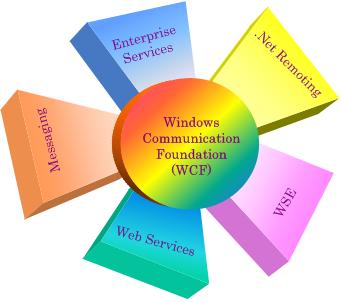
"The WCF unifies the various communications programming models supported in .NET 2.0, into a single model. Released in November 2005, .NET 2.0 provided separate APIs for SOAP-based communications for maximum interoperabilllity (Web Services), binary-optimized communications between applications running on Windows machines (.NET Remoting), transactional communications (Distributed Transactions), and asynchronous communications (Message Queues). WCF unifies the capabilities from these mechanisms into a single, common, general service-oriented programming model for communications.

WCF can use SOAP messages between two processes, thereby making WCF-based applications interoperable with any other process that communicates via SOAP messages. When a WCF process communicates with a non–WCF process, XML-based encoding is used for the SOAP messages but when it communicates with another WCF process, the SOAP messages can be encoded in an optimized binary format. Both encodings conform to the data structure of the SOAP format, called Infoset.

WCF uses a pluggable encoding system, allowing developers to write their own encoders[1]. With the release of the .NET Framework 3.5 in November 2007, Microsoft released an encoder that added support for the JSON serialization format to WCF[2]. This allows WCF service endpoints to service requests from AJAX-powered web pages."


That was taken from the Wiki home page for the Windows Communication Foundation home on wikipedia.org, found here: Wikipedia - Windows Communication Foundation - Home Page

You see when we reference WCF in terms of something that we want to create and make use of, then we are talking about a WCF Service. A WCF Service, as you can read in the wikipedia article, is made up of three parts:


  • Service Class

  • Host Environment

  • Endpoints (aka: Adapters)


So when thinking in terms of today with Dynamics AX 2009, and WCF Service can be defined in the AOT now, and X++ can reference it like a class. This should also be the diffection used for most integrations with AIF, and integrations to and from Dynamcis AX 2009.


(Image Source www.codeproject.com)


This means that when we moved to Dynamics AX 2009, we were a lot closer to having a tighter integration between Dynamics AX 2009 and the rest of the Microsoft stack.

Now there is still a ways to go of course, and since Microsoft is about evolving this, building upon WCF Services now inside and out of your Dynamics AX 2009 instance, means you will be making the right move for the future when Dynamics AX 6.0 & 7.0 comes out.

Because WCF will be moving more and more "into" Dynamics AX and X++, to where WCF could be more tighly used within Dynamics AX itself to delivery internal messaging. This would lead to tighter integration and better introp even more with the rest of the Microsoft stack, which will happen to be also using WCF service to connect and build with.

I think the picture is pretty clear now, WCF should be the focus, and we should start looking into more and more ways of using WCF now and how we will be able to use it in the future.

Some of the latest things out about WCF recently is with REST, Representational State Transfer, which will gives us play into the 2.0 tagged technologies of Enterprise and Web, and the cloud.

Another thing to point out, is how WCF can now, already be used to integrate other existing LOB, Line of Business Applications, like: SAP, PeopleSoft, Oracle, IBM CICS, IMS, etc.

Microsoft released what is calls it's "WCF LOB Adapter SDK" to help with this. The current version is 1.1, and can be downloaded here: WCF LOB Adapter SDK v1.1 Download.

So we have a *Lot* to cover on this as you can tell. The key to take away now, is to start looking into this. Take a dive into the MSDN page, look at the blogs, the articles, what makes up WCF. Also take the time and check out the WCF LOB Adatper SDK. This is a great thing to look at for creating WCF services, that can connect Dynamics AX with other LOB's.

Check back soon, as I will continue to dive into this topic, get back to some SQL Server 2008, cover more BI, and all how it surronds and is used with Dynamics AX.

Also don't miss my post soon on a book review and Author interview I am doing, and the wrap up post on Convergence this week! So much to cover and so little time... see you next time!


"Visit the Dynamics AX Community Page today!"


Labels: , , , , , , , , , ,


Copyright 2005-2011, J. Brandon George - All rights Reserved